Earning rules
Automatic wallet rewards - order cashback, top-up bonuses, signup, review, and birthday rewards - with ledger-grade guarantees and self-reversing cashback.
What earning is
Earning rules credit customer wallets automatically at the moments that grow a store: paying for an order, topping up, creating an account, reviewing a purchased product, having a birthday. Each award is an ordinary ledger transaction with a customer-readable note (“Cashback on order #123”), so everything on How the ledger works applies: awards can never double, per-rule history is always provable, and reversals are visible movements rather than silent edits.
The module switch lives at WooCommerce → Settings → Elite Balance → Earning (on by default). While it is on, the Earning tab appears under WooCommerce → Elite Balance; switching it off pauses all awarding but keeps the tab reachable while rules exist, and reversals of already-awarded credit keep running, because a refund must claw cashback back regardless.
The Earning tab
The tab shows every rule with its trigger, amount, campaign window, status, and an awarded to date counter; clicking the counter opens the Transactions tab filtered to that rule’s awards and reversals, the ledger drill-down. Rules are created and edited right below the list.
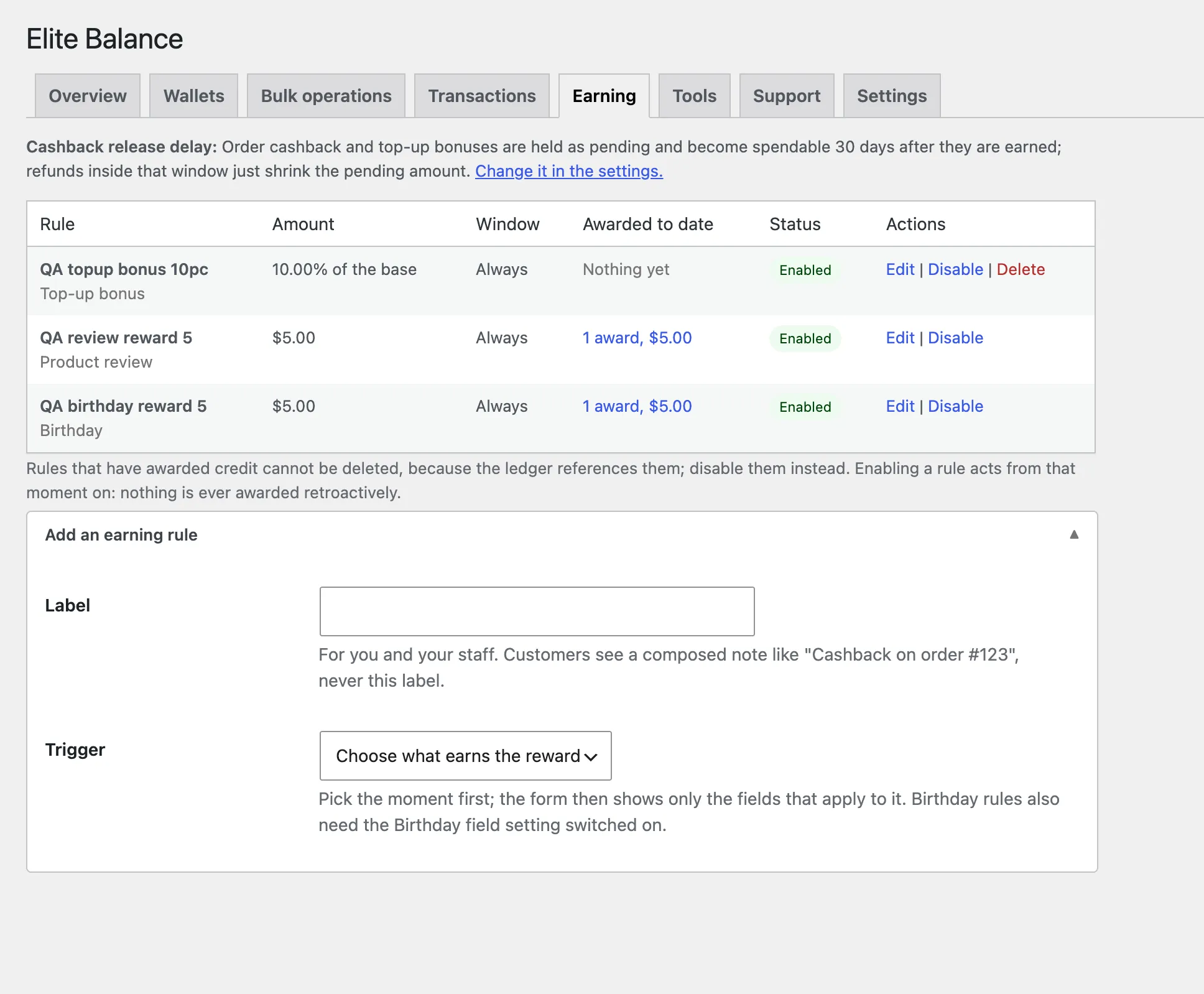
A rule has:
- Label: for you and your staff. Customers never see it; their notes are composed by the plugin.
- Trigger: one of the five moments below. The form asks for it first and then shows only the fields that apply to it, so nothing irrelevant is on screen.
- Amount: a fixed amount, or a percentage of the base for the two triggers that have one (order cashback and top-up bonuses); the percent option is simply unavailable elsewhere.
- Conditions (all optional): a minimum base, products, categories, and roles, each offered only on the triggers it can affect. A condition that cannot apply to a trigger is never stored either, so a leftover selection can never silently stop a rule from firing.
- Campaign window: optional start and end dates, both inclusive, in the store timezone. Perfect for “double cashback week”.
- Behavior: enabled, and whether each award sends the wallet-credited email.
Nothing is ever retroactive. A rule acts on events that happen after it is enabled; enabling never scans history, and re-enabling a rule that was off for a month never awards for that month. What happened while a rule was off stays unawarded, by design.
The five triggers
Order cashback. Fires when an order is first paid. The base is the items total after coupons, excluding shipping and taxes, and minus any pay-by-wallet discount on the order, so the discount and cashback stack honestly. Minimum base, products, categories, and roles all apply. Orders that buy wallet top-ups never earn cashback (they have their own trigger).
Top-up bonus. Fires when a paid top-up credits the wallet; the base is the credited amount, so “5% extra on every top-up” is one percent rule. The minimum base and roles apply.
Signup. Fires when an account is created. Without a roles condition it rewards only new customers, so plain WordPress registrations stay out; add roles to change who counts.
Product review. Fires when a review is approved, and only for logged-in customers who actually bought the product they review. The products condition restricts which products qualify; roles apply too. Deleting a review later does not claw the reward back automatically in this version; debit manually with a reason if you need to.
Birthday. Requires the Birthday field setting (see below). A daily background scan finds customers whose stored birthday is today in the store timezone and awards each at most once per calendar year, a guarantee built into the award itself rather than bookkeeping. February 29 birthdays are honored on February 28 in non-leap years.
The birthday field
Birthday rules need birthday data, and WooCommerce has none, so Elite Balance ships its own field, off by default: switch Birthday field on under the Earning settings and an optional Birthday appears on My Account → Account details. Dates are validated, and a customer can change their birthday once per year, so nobody birthday-hops between reward runs. Switch the setting off and no birthday data is collected; birthday rules then stay silent, and the Earning tab says so rather than letting you wonder.
When cashback becomes spendable
The Cashback release delay setting (under the Earning settings, 0 to 90 days, default 30) holds the two order-linked triggers back: order cashback and top-up bonuses are recorded as pending on the order and only credit once the delay has passed. The default matches a typical 30-day refund window; set 0 if you prefer awards to credit the moment they are earned. Signup, review, and birthday rewards have no refund risk, so they always credit immediately whatever the setting says.
While an award is pending, no money has moved anywhere. The order carries a note with the exact release date, and the customer sees a “Cashback on the way” line on their wallet page with the amount and the date. At maturity, a background job credits the wallet through the normal ledger path, the wallet-credited email goes out then (if the rule sends it), and the rule’s awarded-to-date counter counts it then, because that is when money actually moved.
The reason to use a delay is refunds. Set it to cover your return window and a refund inside that window simply reduces or cancels the pending amount, arithmetic on a record rather than money moving: the wallet is never debited, nothing can fall short, and the customer never sees credit appear and then vanish. Awards already pending when you change the setting keep their original release date; the promise made at earn time holds.
The Earning tab always states the delay currently in effect, with a link to the setting, so whoever writes the rules never has to guess when the rewards become spendable.
When cashback comes back
If an order that earned cashback is refunded or cancelled, the award reverses automatically: partial refunds reverse proportionally to the refunded share of the items base, and a cancellation or full refund reverses exactly what remains. Every reversal is a visible ledger row. (If the award was still pending under a release delay, there is nothing to reverse: the pending amount just shrinks, as above.)
If the customer already spent the credit, the plugin reverses what the balance covers and stops at zero; wallets never go negative. The part it could not recover is flagged: an order note, and an attention card on the Overview and the Earning tab listing each case until you dismiss it. Review the case, and if recovery is appropriate, debit manually with a reason from the customer’s wallet screen. A release delay that covers your refund window makes this situation rare by construction, because the money is not spendable until refunds have stopped being likely.
Deleting versus disabling
A rule that has never awarded can be deleted freely. Once it has awarded, the ledger references it, so the delete action disappears and disabling is the tool: the rule stops acting, its history stays intact, and its drill-down keeps working forever.
Rehearse a rule on staging first: create it, place a test order, refund it, and watch the award and the reversal appear as ledger rows. The whole feature is legible from the Transactions tab.
Stuck, or found a gap in these docs? Tell us and the people who build the plugin answer.
Contact support →